What is the Action Plan?
The Action Plan is a management tool that lets you record, track, and resolve anomalies identified in an organization's processes. Through a standardized structure based on the 5W2H methodology, teams can describe anomalies, identify root causes, and define corrective actions with clear owners and deadlines.
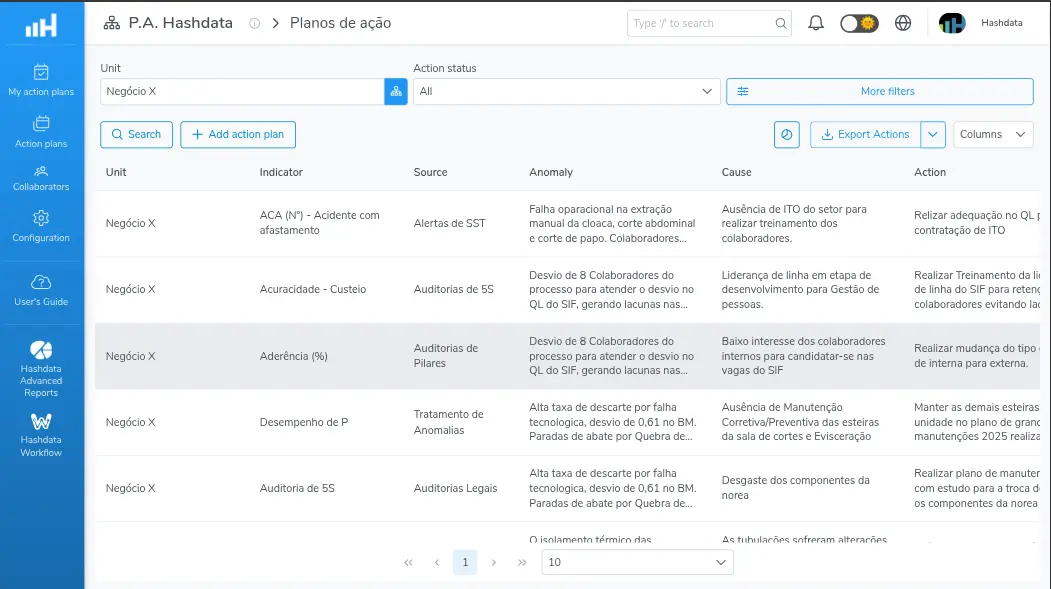
Overview of the Action Plan module
Action Plan Structure
The module organizes information into three hierarchical levels:
Action Plan : Root level that groups the context information. Contains the header with the organizational unit, the source (the moment that generated the need to create the plan), the monitored indicator, and the preparer responsible for creating it.
Anomaly (Problem) : Records the deviation identified in the process. Includes the description of what is deviating (e.g., temperature 10 °C above standard), the root-cause analysis using the 5 Whys (optional), and the root cause that generated the anomaly.
Action (5W2H) : Corrective action linked to the anomaly, structured with the following fields:
| Field | Abbreviation | Description |
|---|---|---|
| Action | What | What needs to be done (e.g., Replace the control valve) |
| How | How | Step-by-step for executing the action |
| When | When | Agreed date for execution |
| Where | Where | Location where the action will be executed |
| Executor | Who | Person responsible for execution |
| Cost | How much | Investment required in R$ |
When to use the Action Plan
The module is suited to situations that require structured handling of anomalies, including:
- Non-conformities in industrial processes — e.g., temperature above standard, pressure outside the specified range
- Quality deviations identified in audits — e.g., out-of-specification product detected during inspection
- Recurring problems in performance indicators — e.g., yield below target for three consecutive cycles
- Handling of safety occurrences — e.g., a recorded incident that requires preventive or corrective action
- Continuous improvement tracking (Kaizen) — e.g., improvement initiatives with defined goals and deadlines
Access to the module
The Action Plan module can be accessed from the application's main menu. Access requires, at minimum, the View action plan permission. Creating and editing plans requires the Create and edit action plan permission.
The module is composed of three main areas:
- Action Plans: displays the complete list of plans with advanced filters by unit, source, indicator, executor, status, and period
- My Actions: automatically filters the actions in which the logged-in user is the executor or the responsible effectiveness verifier
- Settings: allows managing the module settings, such as profiles, indicators, sources, action types, measurement units, and dimensions. Requires the Manage settings permission
Ready to get started? See the step-by-step guide to creating an Action Plan
Lifecycle of an action
Each action goes through a lifecycle spanning from creation to effectiveness verification. The possible statuses reflect progress with respect to the deadline and completion:
| Status | Meaning |
|---|---|
| On-time action | Action within the defined deadline |
| Overdue action | Deadline passed without completion |
| Awaiting verification | Action completed, pending effectiveness verification |
| Verification overdue | Verification deadline has passed |
| Completed action | Completed and verified within the deadline |
| Completed action (late) | Completed after the deadline |
| Cancelled action | Cancelled before completion |