Action Types
Action Types allow you to classify the corrective actions created in the Action Plan, making analysis and filtering easier. Each action in the plan can be assigned a Type that indicates the nature of the planned intervention.
The Type field is available in the action creation and editing form (5W2H sidebar) and is configurable according to each organization's reality.
What Types are for
The Action Type answers the question: "What is the nature of this action?". It allows you to differentiate immediate interventions from structural actions, making effectiveness analysis and prioritization easier.
Examples of useful Action Types:
| Type | When to use |
|---|---|
| Immediate action | Quick containment of the problem while the root cause is still being investigated |
| Corrective action | Elimination of the identified root cause of the deviation |
| Preventive action | Prevention of deviations before they occur, based on risk analysis |
| Continuous improvement | Optimization actions that go beyond correction, aiming to raise the standard |
By categorizing actions by type, you can analyze, for example, the proportion of corrective versus preventive actions over time, or identify units with a high volume of immediate actions — which may indicate the need for deeper investigation.
Creating and managing Types
Action Types are managed in the module settings area. To access it, the Manage settings profile is required.
Accessing the settings:
- In the side menu, go to Action Plan Settings.
- Click the Types tab.
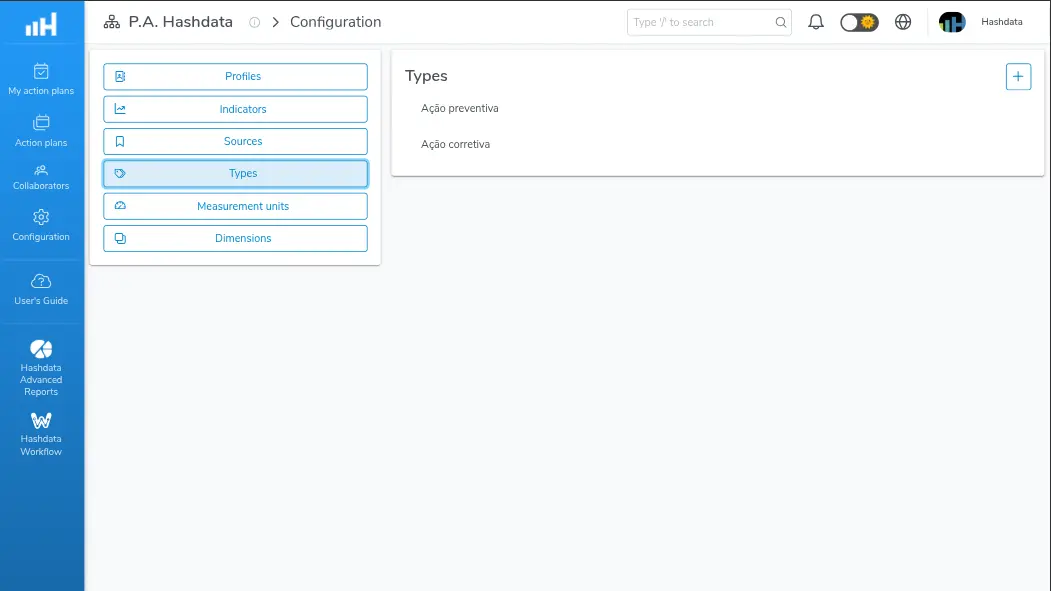
Action type configuration for Action Plans
Creating a new Type:
- Click the New type button.
- Fill in the Name field with the desired classification. E.g.:
Corrective action. - Click Save.
Editing an existing Type:
- Find the Type in the list.
- Click the edit icon.
- Change the Name field.
- Click Save.
Removing a Type:
- Find the Type in the list.
- Click the delete icon.
- Confirm the removal.
Removing a Type that is already associated with existing actions may impact historical categorization. Check whether the Type is in use before deleting.