Sources
Sources identify the context that generated the need to create an Action Plan. By associating a Source with the plan, it is recorded which event or situation motivated the creation of the corrective actions.
What Sources are for
The Source answers the question: "What generated the need for this plan?". It allows you to categorize the origin of the deviation or opportunity, making historical analysis and traceability easier.
Examples of common Sources:
| Source | Description |
|---|---|
| Internal audit | Deviation identified in an audit conducted by the organization itself |
| External audit | Deviation pointed out by a third-party or certifying audit |
| Indicator analysis | Indicator off target that generated the need for action |
| Customer complaint | Problem reported by an internal or external customer |
| Safety occurrence | Incident or near-miss that requires corrective action |
| Process non-conformity | Deviation identified in the production or administrative process |
When filtering or exporting action plans, the Source allows segmenting the data by source type, which makes recurrence analysis and audits easier.
Creating and managing Sources
Sources are managed in the module settings area. To access it, the Manage settings profile is required.
Accessing the settings:
- In the side menu, go to Action Plan Settings.
- Click the Sources tab.
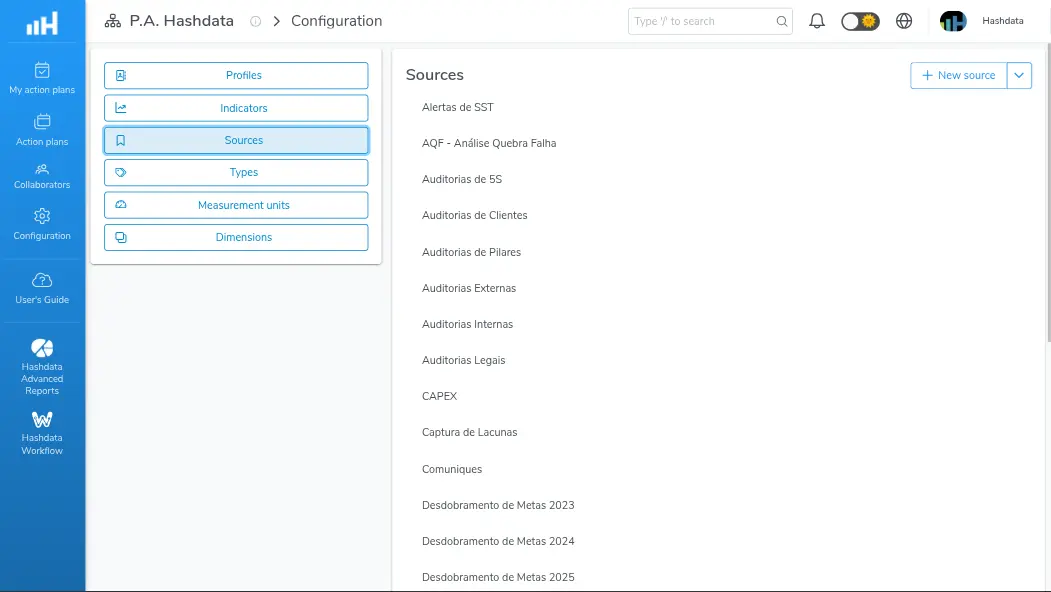
Source configuration for Action Plans
Creating a new Source:
- Click the New source button.
- Fill in the Name field with the source description. E.g.:
Internal audit. - Click Save.
Editing an existing Source:
- Find the Source in the list.
- Click the edit icon.
- Change the Name field.
- Click Save.
Removing a Source:
- Find the Source in the list.
- Click the delete icon.
- Confirm the removal.
Removing a Source that is already associated with existing action plans may impact historical traceability. Assess the impact before deleting.
Use descriptive, standardized names for Sources. Avoid variations such as "Int. Audit", "Internal Aud." and "Internal Audit" — define a single standard so filters and reports work consistently.